Track every unit in your warehouse by its own barcode.
Most inventory systems count SKUs. WMS tracks each physical item: the package it arrived in, the tote and shelf it went to, who picked it, and when. It runs on off-the-shelf phones and scanners and connects to Shopify, ShipStation and NetSuite.
- In production at [Customer Name]
- [X] years in warehouse software
- No per-user fees
- Shopify
- ShipStation
- NetSuite
- DYMO label printing
Counts that don't match the shelf
When the count says 12 and the shelf has 9, a system that tracks quantity per SKU can't tell you where the other 3 went. Spreadsheets, ERP inventory modules and most shipping tools work that way. WMS keeps a record for each unit, so a missing item has a history you can look up.
Overselling after a delivery
Stock sitting in an unopened box either shows as sellable too early or not at all. WMS updates the store's quantity as each unit is unpacked and scanned.
Moves nobody wrote down
Every scan records the user and the time. To see where a unit has been and who handled it, search its barcode.
Picking that depends on Dave
If only Dave knows where a SKU lives, picking slows down on Dave's day off. Picklists list every stop by bin location, so a new picker can follow them.
Six steps from the receiving dock to the pick cart
Units are tracked inside the containers your team already uses: packages, totes, pallets and shelves. When a container moves, everything in it moves with it.
Map locations
Model each facility as aisles, bays, shelves and bins. Tag zones for receiving and shipping, and define custom events as items move.
Receive
Log inbound packages by tracking number when they arrive. Open them and check the contents against what you ordered.
Unpack
Each unit gets its own barcode as it's unpacked. Sellable quantities in your store update immediately.
Move
Scan a single item, a tote or a whole shelf to move it. A tote on a pallet moves with the pallet.
Pick
Orders from Shopify or ShipStation are grouped into picklists, 8 orders per list by default, with stops sorted by location. Picklists also handle returns and restocking.
Trace
Pull the full history of any unit, location or container: where it's been, when, and who scanned it.
How [Customer Name] uses WMS
[One-line description, e.g. “National distributor · 3 facilities · 40,000+ SKUs”]
“[A short, specific quote from your contact about what changed after rolling out WMS — ideally naming a number or a problem that went away.]”
Reports built from every scan
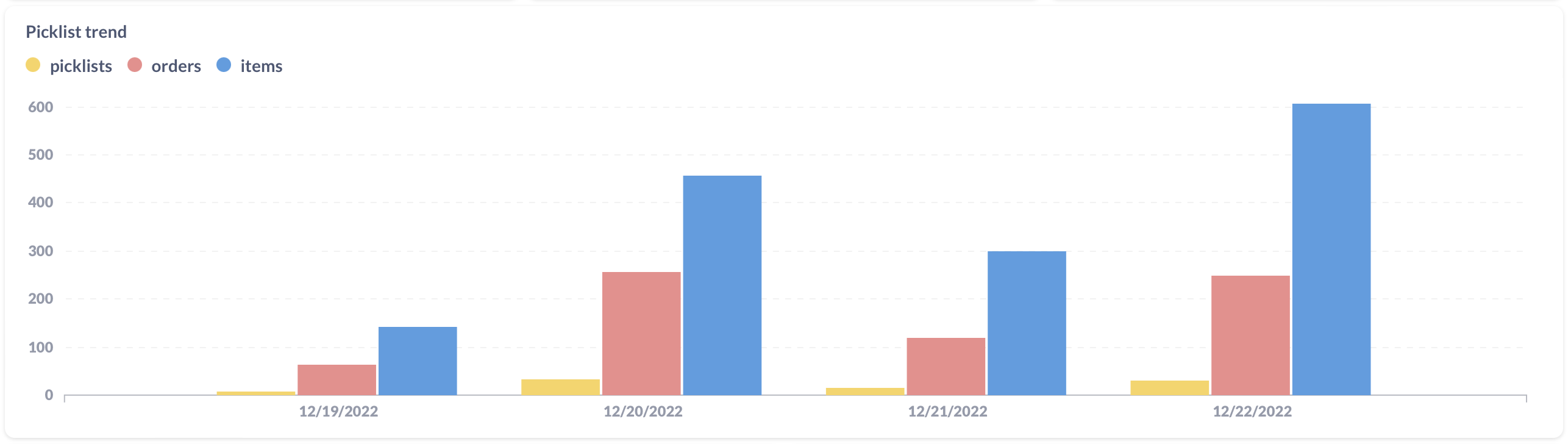
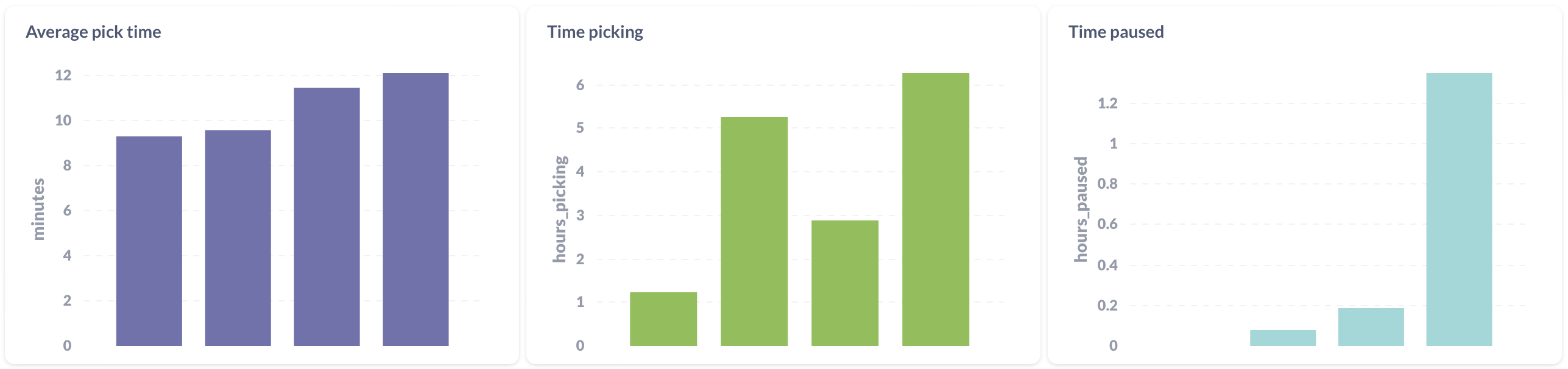
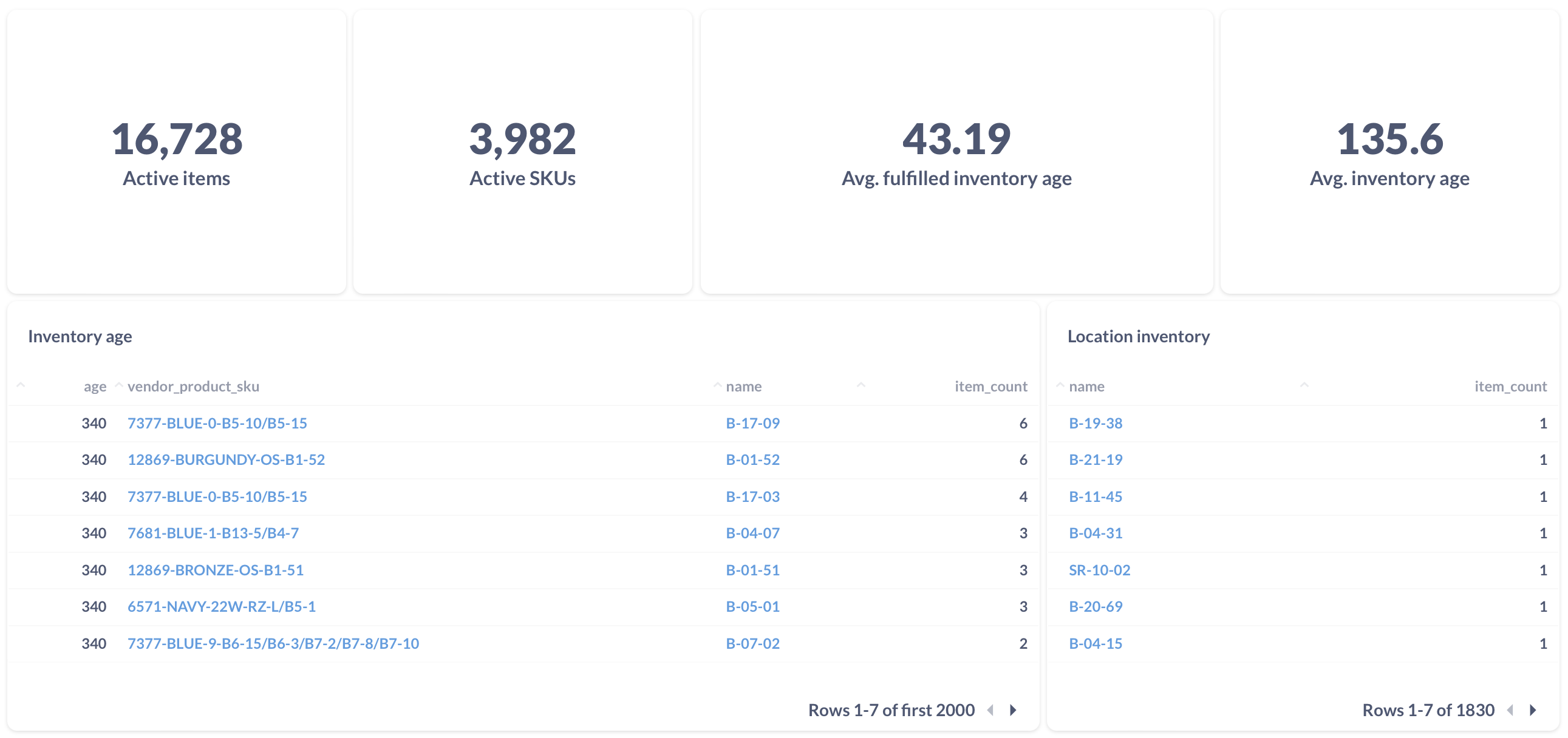
Every move is logged with a user and a time, so reports can show how long picklists take, which SKUs have sat on the shelf longest, and how many units each person moved this week.
- InventoryActive, lost and aging items and SKUs; SKU distribution
- MovementTime, volume and location metrics
- PeoplePer-employee throughput across picking and moves
- ManufacturingBuild-phase timing and process analysis
Need a report we don't have? Ask us. Custom reports are included in the per-item price.
The things that usually cost extra don't.
Unlimited users
Admins can add pickers and seasonal staff whenever they need to, with roles and permissions. Users are free.
Multiple facilities
Add a second building or a third. We charge for the items you track, not the square footage.
Retail hardware
Run on off-the-shelf phones, scanners and DYMO label printers instead of proprietary handhelds.
Manufacturing flows
Track build phases as components become finished goods, with timing for every step.
Custom events
Trigger an event when an item reaches a location, and use it in reports, in manufacturing steps, or to notify another system.
Live support
Support chat goes to Cameron and Sean, who write the code.
See your price before you talk to anyone.
You pay monthly for the items you track. The first 5,000 items cost $0.10 each, and the rate drops by one cent for each 5,000 after that, down to $0.01 past 45,000. Users, facilities, integrations and support cost nothing extra.
- Unlimited users and facilities
- Shopify, ShipStation & NetSuite integrations
- Reporting dashboards and custom reports
- Support from the two people who write the code
- 1 – 5,000$0.10
- 5,001 – 10k$0.09
- 10k – 15k$0.08
- 15k – 20k$0.07
- 20k – 25k$0.06
- 25k – 30k$0.05
- 30k – 35k$0.04
- 35k – 40k$0.03
- 40k – 45k$0.02
- 45k +$0.01
Rates are progressive: each tier's rate applies only to the items within it.
You talk to the people who built it.
WMS is built and run by two people. We've worked on warehouse software for [X] years. [We started building WMS in 20XX for (who), because (what was broken).]
- Bug reports and feature requests come straight to us.
- When something breaks, the person who replies can fix it.
Cameron Dudley
[Role][One or two sentences: warehouse/software background, what you own day to day.]
Sean Brown
[Role][One or two sentences: warehouse/software background, what you own day to day.]
Common questions
What counts as an item?
An item is a single physical unit with its own barcode. You're billed monthly on the active items you track, using the progressive rates above. Users, facilities and locations are free.
Do we need special scanners or handhelds?
No. WMS runs on off-the-shelf phones and scanners and prints barcode labels on DYMO printers. You won't need to buy proprietary handhelds.
Which systems does it integrate with?
Shopify and ShipStation for products and orders, and NetSuite. Custom events can also trigger other third-party integrations as items move through your facility.
Can we run more than one warehouse?
Yes. Add as many facilities as you need; each has its own locations and zones, all managed from one account.
What if we need a report or workflow you don't have?
Ask us. Custom reports and manufacturing flows are part of the service, and we build them ourselves.
How does support work?
Through live chat, which Cameron and Sean answer themselves.
Book a 30-minute demo
Tell us roughly how many units you handle and what's going wrong. Cameron or Sean will email you to pick a time.
On the call we'll walk through receiving, moves and picking with inventory like yours, and tell you what WMS would cost per month.